
Sitecore Tracking with OneTrust - Cookie Compliance

As a OneTrust partner, we have implemented the OneTrust cookie compliance banner on multiple CMS platforms. When implementing OneTrust with Sitecore, we need to review which data is tracked in Sitecore and how it should be managed in OneTrust.
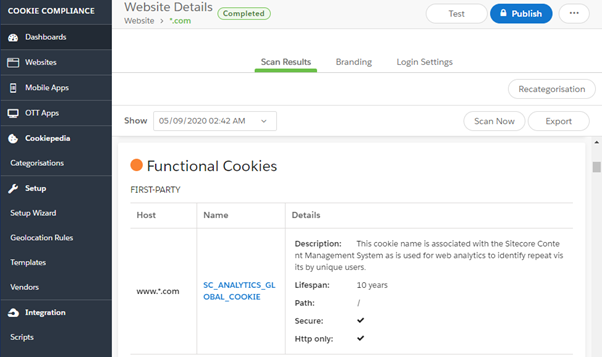
Sitecore tracking allows you to identify contacts as they navigate your site during initial and returning visits. When this Sitecore tracking is enabled, Sitecore uses a cookie named "SC_ANALYTICS_GLOBAL_COOKIE" to track contacts. You must determine what information you are tracking and how it should be categorised in OneTrust to be cookie-compliant.
Categorising the Sitecore cookie in OneTrust
Within OneTrust any cookie that is categorised as "Strictly Necessary" will load automatically and doesn’t needs to be controlled by the website user. If you decide that Sitecore tracking needs to be categorised as any other category such as “Functional Cookies” then you need to implement a code solution to handle this. The cookie needs to be enabled or disabled based on the user's preferences in the cookie compliance banner. To achieve this, we must implement a code solution.
Handling the Sitecore cookie through code
The following focuses on the management of the Sitecore tracking cookie after the OneTrust cookie consent banner in place. In the OneTrust control panel we have categorised the "SC_ANALYTICS_GLOBAL_COOKIE" as a "Functional Cookie".
Check functional cookie consent
When a user sets their cookie preferences using the OneTrust cookie banner, a cookie is created "OptanonConsent" which record the user's preferences. We need to do several checks:
- Cookies named "OptanonConsent" exist.
- "OptanonConsent" contain a reference to "Functional Cookies" and has been enabled.
- "C0003" represents the “Functional Cookies” category.
- 0/1 values with 1 being enabled.
- Start tracking once the above criteria are met.
- Otherwise stop tracking as the user has opted out.
Custom pipeline
namespace Sitecore.Foundation.SitecoreExtensions.Pipelines
{
    using Sitecore.Analytics;
    using Sitecore.Diagnostics;
    using Sitecore.Pipelines;
    using System.Web;

    public class CheckConsent
    {
        public virtual void Process(PipelineArgs args)
        {
            Assert.ArgumentNotNull((object)args, "args");
            var optanonConsent = HttpContext.Current.Request.Cookies["OptanonConsent"];
            var trackingConsent = false;
            if (optanonConsent != null && !string.IsNullOrEmpty(optanonConsent.Value))
            {
                if (HttpUtility.UrlDecode(optanonConsent.Value.ToString()).Contains("C0003:1"))
                {
                    trackingConsent = true;
                }
            }
            if (trackingConsent)
            {
                if (Tracker.Current == null)
                {
                    Tracker.StartTracking();
                }
                if (!Tracker.Current.IsActive)
                {
                    Tracker.Current.StartTracking();
                }
            }
            else
            {
                Tracker.Current.EndVisit(true);
                Tracker.Current.EndTracking();
                args.AbortPipeline();
            }
        }
    }
}
Create a pipeline reference that executes the above code before the default Sitecore CreateTracker runs.
<configuration xmlns:patch="http://www.sitecore.net/xmlconfig/" xmlns:set="http://www.sitecore.net/xmlconfig/set/">
    <sitecore>
        <pipelines>
            <startAnalytics>
                <processor type="Sitecore.Foundation.SitecoreExtensions.Pipelines.CheckConsent, Sitecore.Foundation.SitecoreExtensions"
                patch:before="processor[@type='Sitecore.Analytics.Pipelines.StartAnalytics.CreateTracker,Sitecore.Analytics']" />
            </startAnalytics>
        </pipelines>
        <settings>
            <setting name="Analytics.CookieLifetime" value="8760" />
        </settings>
    </sitecore>
</configuration>
Sitecore cookie lifetime
We should also look to change the Sitecore cookie lifetime as by default it is set to 10 years.
Using a patch file, we can change the lifetime to 1 year:
<setting name="Analytics.CookieLifetime" value="8760"></setting>
Enable/Disable tracking in your MVC layout
We need to handle the loading of the VisitorIdentification helper tag on your frontend layout.
If you have tracking enabled currently, you will have the following defined in your website layout.
@using Sitecore.Mvc.Analytics.Extensions
@Html.Sitecore().VisitorIdentification()
We do not want to load the VisitorIdentification helper tag if the user has opted out of Functional Cookies. We need to create a device with a new layout that does not have this reference. We can then redirect users to this device when they have opt out.
Ensuring your Sitecore cookies are correctly categorised is vital for cookie compliance. Using OneTrust, we found an easy solution to scan and categorise cookies on our client's platforms. The above Sitecore solution allows the website user to gain extra control over how their data is used and whether they opt in to being tracked.
We can help you manage and maintain your Sitecore website, and if you need help with implementing OneTrust on your Sitecore site, contact us today.
/itil-certified-agency.webp?sfvrsn=d838cfa9_1)
/b2b-aiseo-yes.webp?sfvrsn=c1278e05_1)
/cludo-partnershipacfb0690-5725-4ecf-8f12-4ff81435119e.webp?sfvrsn=31f81c5b_1)